We have some important news: iBroadcast’s pricing is changing. This was a tough call, and not one we made lightly.
Since the beginning, a generous free service has been one of our core values. We built iBroadcast so anyone could store and stream their own music collection with as limited cost as possible, and we’ve worked hard to keep it that way for a long time. But storage and bandwidth aren’t free, and running iBroadcast costs money. To keep iBroadcast around for the long haul, we have to make some changes.
We'll be adding limits to the free service, and we're introducing a new, lower-priced Premium tier for those who don't need unlimited. The price of Premium Unlimited is also going up by $1 a month. We designed the plans to work for as many people as possible, so you only pay for what you need.
The timeline
The new plans will be available within the next 30 days. The new free limits will take effect 60 days from when they become available. We’ll send reminders along the way, so you’ll have plenty of time to decide what works best for you and your library.
What's changing
iBroadcast will offer three plans:
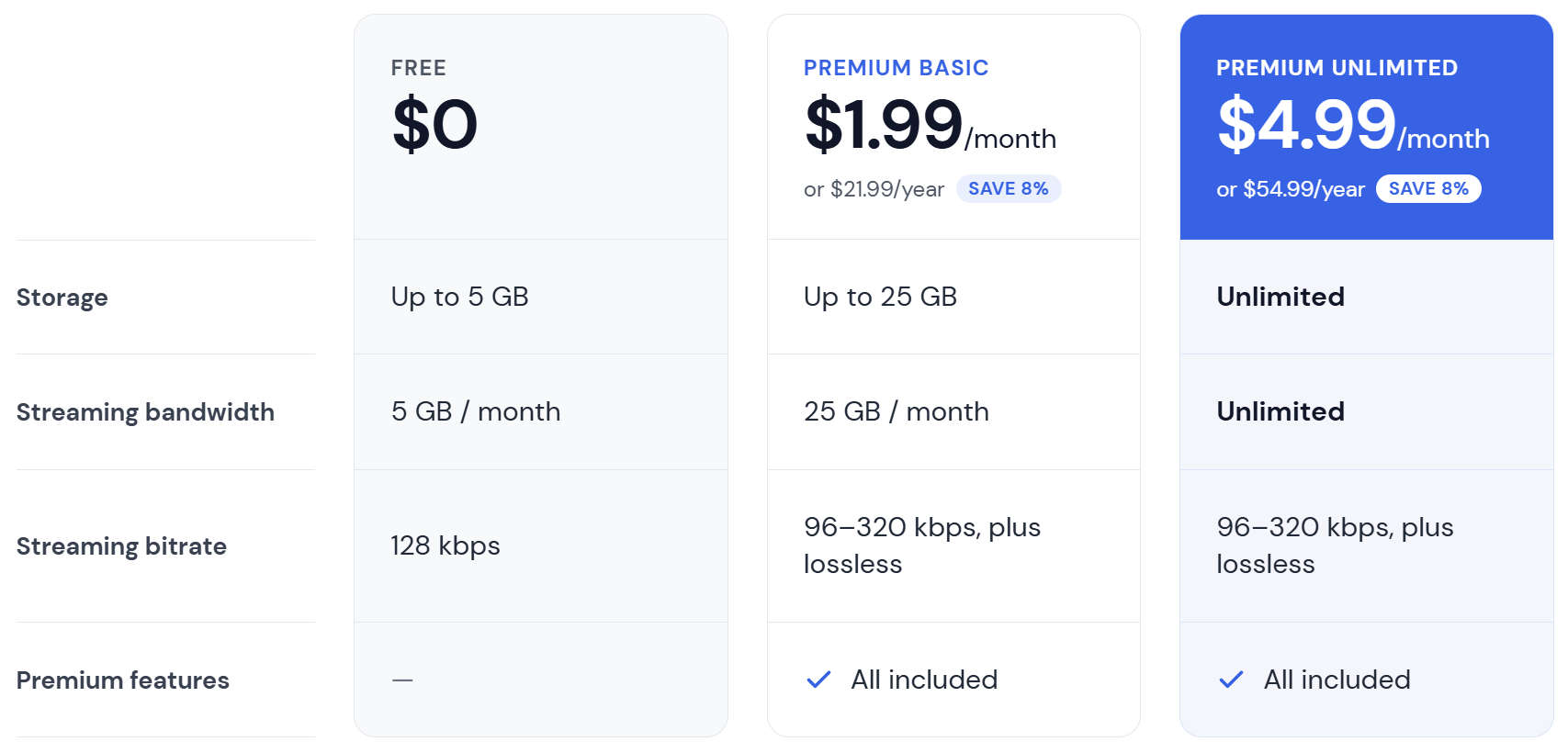
What’s not changing
Premium features stay exactly the same, and both Premium plans include all of them. The only difference between Basic and Unlimited is how much storage and bandwidth you get. Premium features include:
- Variable quality streaming, from 96 kbps up to 320 kbps, plus lossless
- Priority customer support
- Lyrics and custom metadata fields
- Missing metadata detection
- And more
If you’re already a Premium subscriber
Thank you! Your current plan will continue as-is until your next renewal. At that point, you’ll move to the new Premium Unlimited rate of $4.99/month or $54.99/year.
What happens after the 60 day notice period
If your library fits within your plan’s limits, nothing changes for you.
If you’re currently a free user and your library is over 5 GB, your library will be capped at the free limit. Your oldest uploads will remain available, and anything beyond the limit will be hidden. Your files won’t be deleted; they’ll come back as soon as you upgrade or free up space.
When that happens, you can also start a free 30-day trial of Premium. It gives you full access to everything Premium offers, and it gives you extra time to sort out your library before the limit takes effect.
What you can do now
- Check your library size. In the mobile app, go to the Profile tab. In the web player, click the three dots next to My Library and choose Library Summary.
- Delete unavailable files. Trashed files still count toward your storage. When you empty your trash, those files move to Unavailable Files. To remove them for good, go to your Track Dashboard and delete your Unavailable Files. If you’ve been uploading and replacing files for years, this could free up a surprising amount of space.
- Pick the plan that fits. For many listeners, Premium Basic will cover their whole library at minimal cost.
Thank you
This was a hard decision, and we know it’s not welcome news. Many of you have been with us for years, and many of you already support us through Premium. That support is the reason iBroadcast exists today. These changes are about making sure it’s still here years from now.
If you have questions, please send us feedback inside the apps or web player. We’re happy to help.
— The iBroadcast Team