February 23, 2026

We’ve made a change to how MediaSync Lite handles tracks that were previously deleted from your library.

What’s changed:

Tracks that have been fully deleted (moved to Trash and emptied) will now re-upload, even if you have “Skip files already uploaded to my library” checked.

Previously, if duplicate skipping was enabled in MediaSync Lite, deleted tracks were skipped.

How to prevent a track from being re-added:

If you don’t want a deleted track to return, remove it from the local folder you’re scanning for uploads.

Why we made this change:

  • This update prepares for an upcoming “synced folder” feature that will keep your iBroadcast library synced with a local folder on your device.
  • We also heard feedback from users who found the previous behavior confusing and wanted a way to permanently delete tracks. You can now delete tracks or albums — or even clear and re-upload your entire library — without needing to delete your account.

You can still see a record of past uploads in your Track Dashboard and restore them there, but this update makes it easier to re-upload in bulk.

For new users, this behavior should feel intuitive. For long-time users accustomed to the previous system, we wanted to clearly explain what’s changed.

As always, we welcome your thoughts and feedback!

December 10, 2025

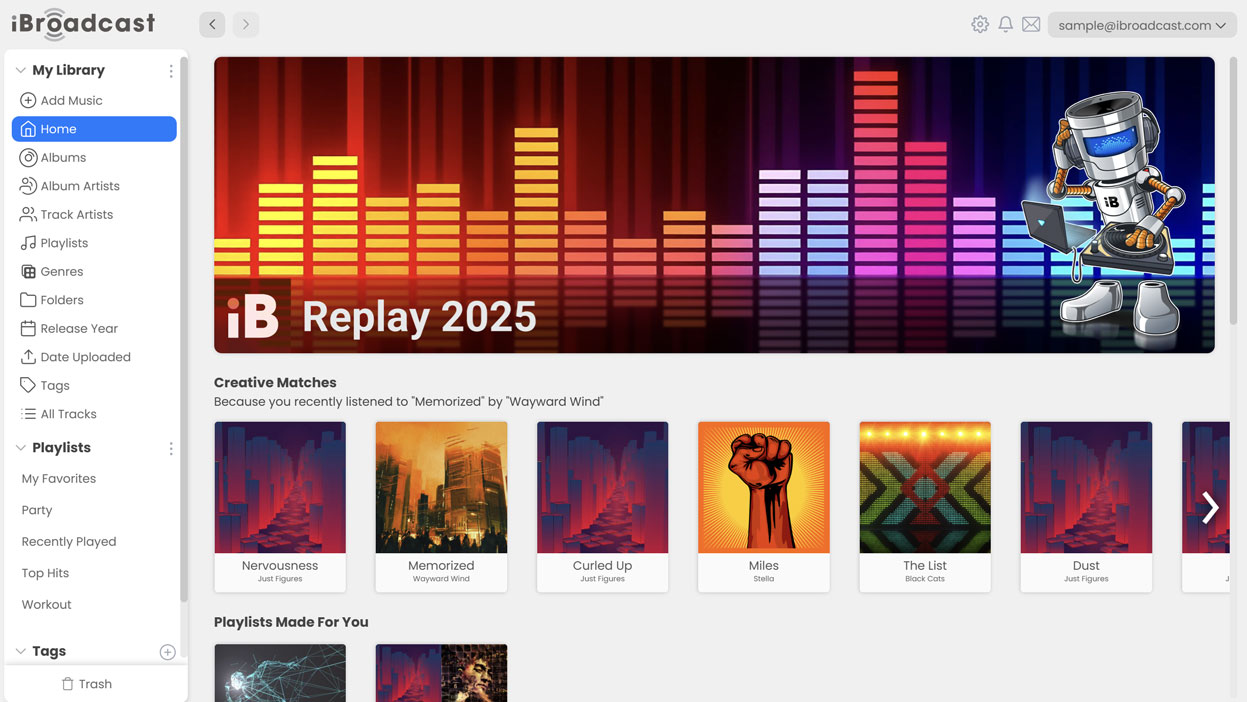
Our year-end recap feature, iBroadcast Replay, is now live for 2025 — bringing you a full breakdown of your listening habits for the past year! From your top tracks to your most listened albums and favorite artists, Replay delivers a personalized snapshot of your music journey.

How to check your Replay stats:

  • On the web player: Go to Home and click the Replay banner at the top.
  • On the app (version 9.1 and later): Tap the Replay banner from the Home view.
  • Browse to see your total listening time, play counts, top artist for each month of the year, and other personalized insights.
  • Switch between years at the top to compare your listening habits to last year.

Want to share your year in music? Copy the link to share it with your friends — your stats are publicly viewable via your personal link.

Check out your 2025 music story now — we can’t wait to see what you discover!

December 9, 2025

Good news for lyric-lovers — Premium members can now add lyrics and custom metadata fields to any track within iBroadcast!

Because iBroadcast is built around your personal music collection, lyrics and extra metadata aren’t automatically sourced. Just like your audio files, these details are added by you, and are completely optional — you control how your library looks and feels!

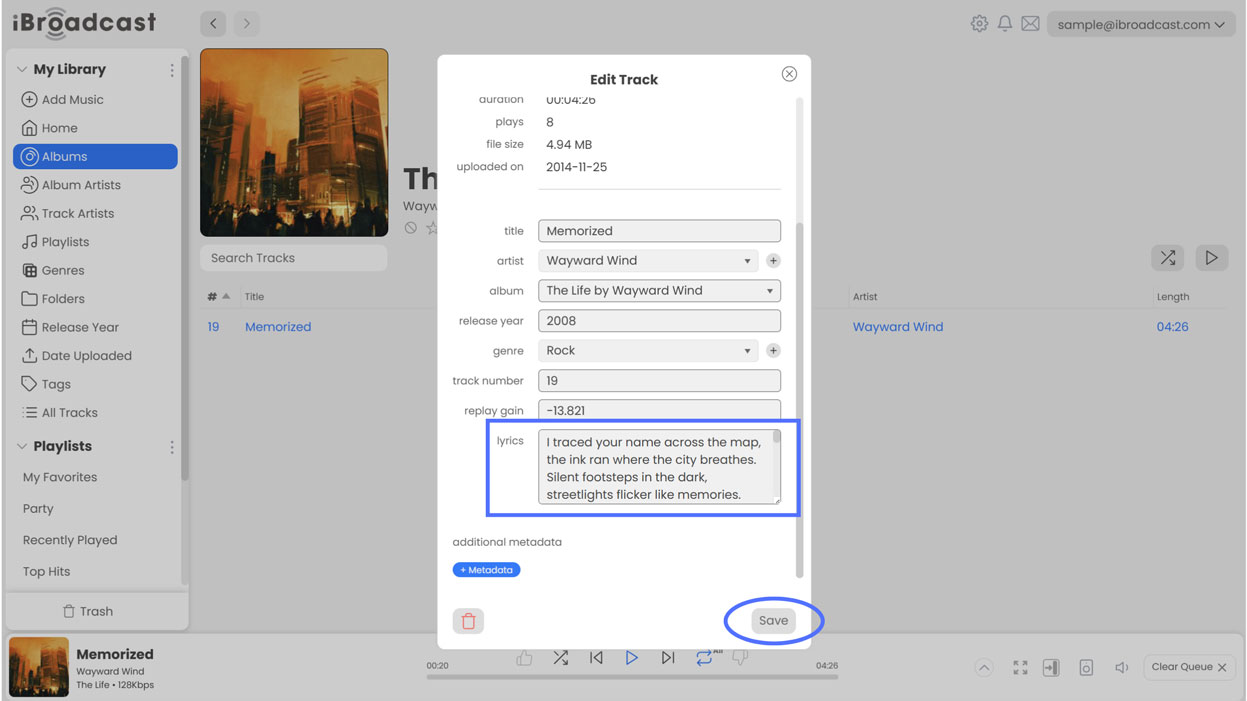
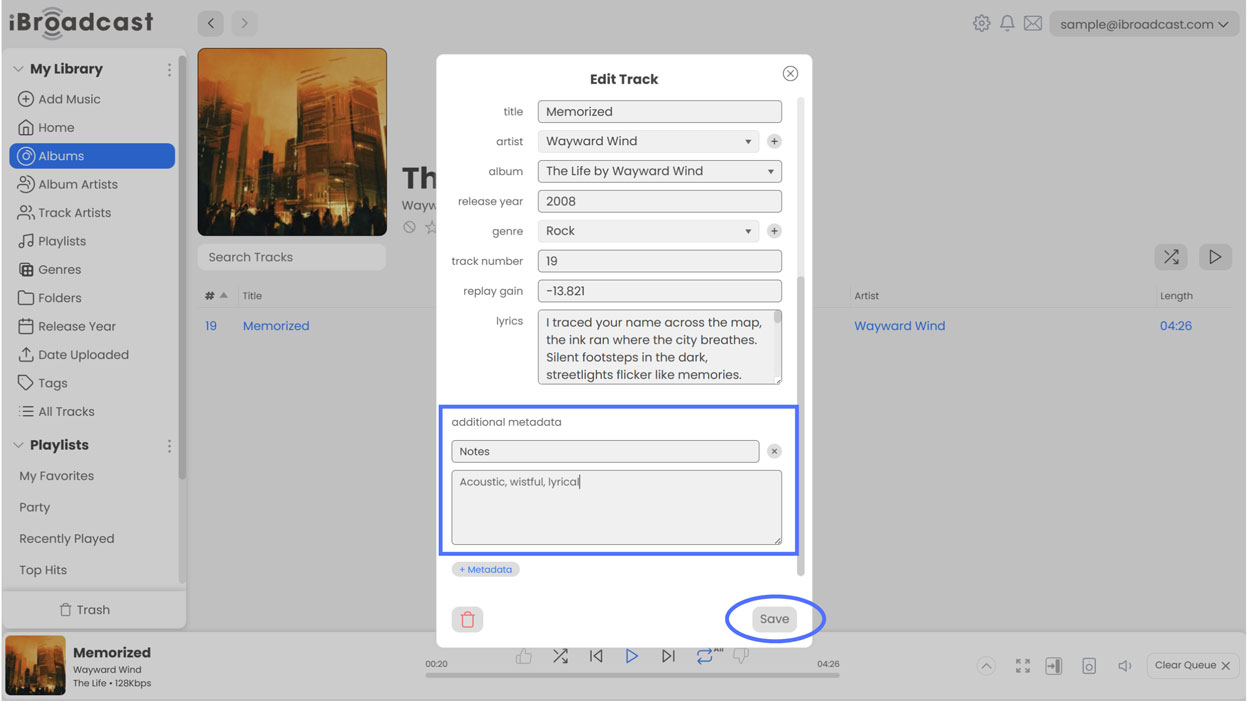
To add lyrics or metadata, open any track on the web player and select “Edit Track”.

Lyrics: Add or paste lyrics into the new Lyrics field.

Custom Metadata: Click +Metadata to create a custom field, give it a title, enter your content, and save.

Custom metadata fields can be anything you want, and they only stay within your iBroadcast library — your original files won't be affected.

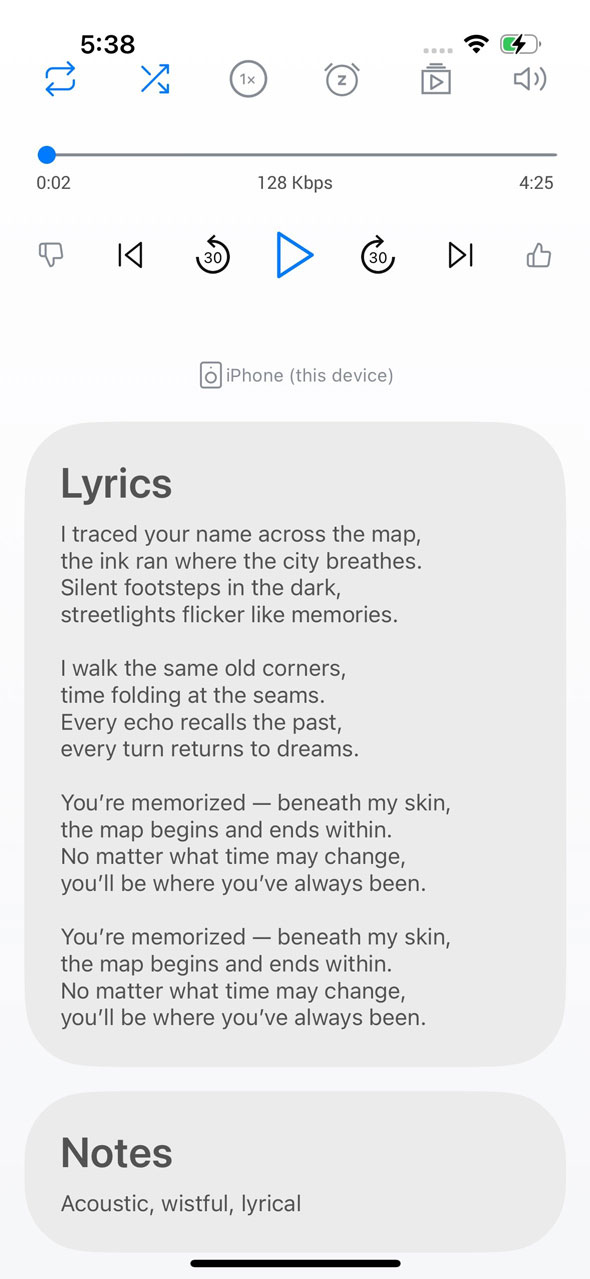
Lyrics and custom metadata will display on the web player’s full-screen mode (coming soon), and on the full-screen player of the mobile app beginning in version 9.1, which is now live! For more details, see our article below on the iOS/Android 9.1 update.

December 9, 2025

Our latest update is here! Version 9.1 introduces our highly-requested lyrics feature, along with important quality-of-life improvements across both iOS and Android.

1. Lyrics and Custom Metadata are here! By popular request, you can now display lyrics and additional custom metadata in the full-screen player. Lyrics are user-added, giving you complete control over what appears. All lyrics and metadata are fully editable in the web player under “Edit Track.” Editing lyrics within the app is coming in a future update.

2. Your Settings and Downloads Stay Put. Logging out and back into your account no longer resets your preferences or removes your downloaded tracks. Note: If you log in to a different account on the same device, settings and downloads from your original account will not carry over.

3. Help Center Links. All in-app help links now point to the updated iBroadcast Help Center for quicker access to guides and support.

Full release notes are below:

  • Display lyrics and additional custom metadata on full screen player (editable on web player)
  • Added 10 seconds to Skip Forward/Backward time
  • Logging out and in doesn't reset settings or downloads
  • Updated links to new Help Center
  • Bug fixes and stability improvements

iOS Only

  • Added Liquid Glass design elements

Android Only

  • Fixed issues reconnecting to Chromecast when network is lost
  • Searching in track lists now searches tags when "Search All Fields" is enabled
  • Fixed an issue with playback freezing on certain devices

October 21, 2025

We're excited to introduce the new iBroadcast Help Center -- your go-to destination for answers and everything related to using iBroadcast! Whether you’re a longtime user or brand new to the platform, you’ll now find detailed, searchable articles to make it easier than ever to find answers, explore features, and get the most out of your listening experience.

Our previous FAQ provided a solid overview, but because iBroadcast is so customizable and feature-rich, we wanted to create a more robust guide to explain each topic thoroughly.

The Help Center covers topics like:

  • Getting started
  • Playing music
  • Managing your music library and uploads
  • Account management and Premium membership
  • Troubleshooting and FAQs
  • Configuring settings and using iBroadcast with other devices
  • Developer guides

We'll continue to add new content as iBroadcast evolves. If there's a topic you'd like to see covered, let us know via the Contact iBroadcast Support section -- we'd love to hear from you!

Visit the Help Center here: help.ibroadcast.com

August 20, 2025

iBroadcast version 9.0 for iOS and Android is available now! This update includes an expansion of our audio quality settings to automatically adjust for variable network speeds, better support for previously unplayable files, and other highly requested features.

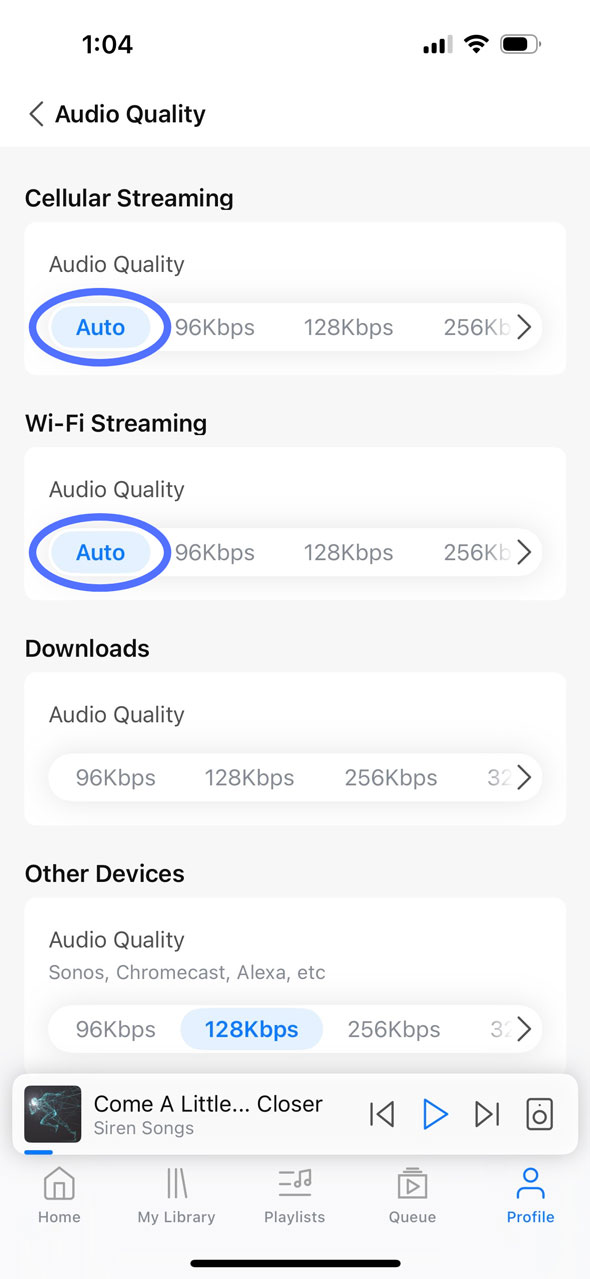
1. Automatic audio quality setting. The mobile app now supports “Auto” audio quality, also known as adaptive bitrate, which automatically adjusts playback to the highest quality that your network can support without interruptions. “Auto” may be a good option if your network connection tends to vary while you’re enjoying your music. To enable it, go to Profile > Settings > Audio Quality and choose “Auto” when streaming on cellular or wifi.
2. Unsupported original files will now play in the nearest supported bitrate. Similar to our recent web update, the mobile app will now convert unsupported original files to another playable format to prevent any unnecessary disruptions to your streaming experience. Previously, Premium users who had playback quality set to “Original” could experience issues if the original file was in a format that isn’t natively supported by the app, such as ALAC (Apple Lossless) files on Android. Now, even if your streaming preferences are set to Original, the system will automatically detect unsupported files and convert them to the closest available bitrate, such as 320 Kbps.

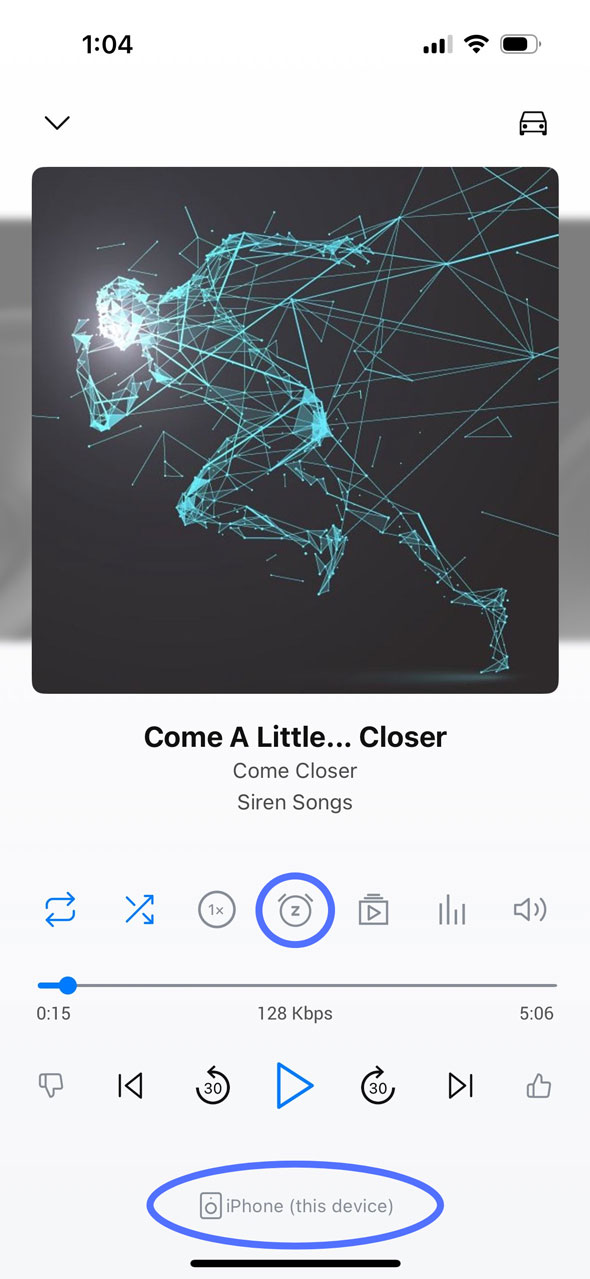
3. Moved the Sleep Timer and My Devices to the Full Screen Player. We’ve moved the Sleep Timer and My Devices from Settings to the Full Screen Player for easier access with fewer steps. The Sleep Timer (alarm clock icon) is above the progress bar, whereas My Devices will now show the device you’re currently playing to at the bottom of the screen. Tap it to bring up the full Devices menu. To remove either of these from the Full Screen Player, go to Profile > Settings > Library > Player Buttons to customize which buttons will appear.
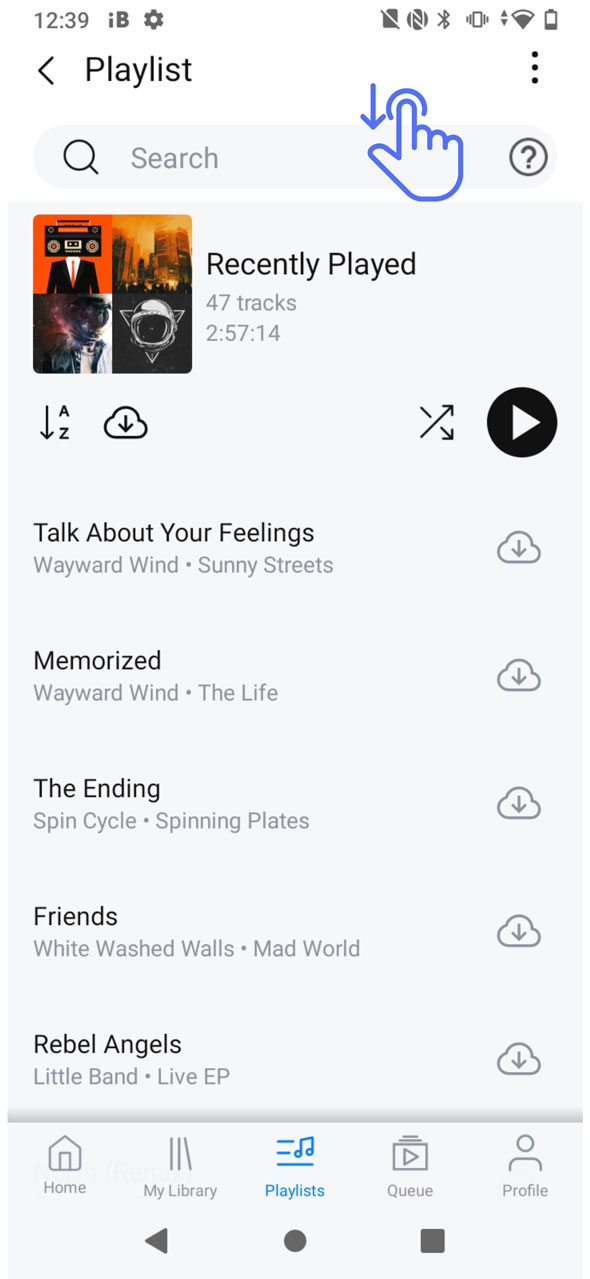
4. (Android-only) Search for tracks inside any track list. The Android app now has the same functionality to search for a track inside any track list, such as a playlist or album. To access the search bar from inside a playlist or album, simply pull down from the top of the screen to bring it into view. This feature is especially useful for those with very long playlists who want to easily find a track without scrolling.
We hope you enjoy these updates, and please let us know what you think!

Full release notes are below:

  • Adaptive bitrate (“Auto” audio quality)
  • Fall back to closest bitrate for unsupported original formats
  • Moved Sleep Timer to the full screen player
  • Layout changes to the full screen player
  • Playlist search now searches the contents of playlist folders
  • Bug fixes and stability improvements

Android Only

  • Changing the album name in Edit Track no longer adds the artist name
  • Search for tracks inside any track list
  • Fixed an issue syncing Shuffle and Repeat with full screen player and Android Auto
  • Fixed an issue clearing multi-select after use
  • Fixed issue displaying artwork when an artist artwork is missing